

Do You Need WiFi for Motorized Smart Shades? What RYSE Requires (and What It Doesn't)

Short answer: no, you do not need WiFi to use RYSE SmartShades day to day. When paired directly with your phone, your shades can raise and lower over Bluetooth and with the buttons on the device itself, with no internet connection at all.
However, you do need WiFi if you choose to use the RYSE SmartBridge, when you want the extra layer: schedules, voice control, and control from anywhere.
Here is exactly what works offline, what needs a connection, and how to decide what to buy.
Why This Question Matters
People ask this for good reasons. Renters may not want to route a device through a shared network, spotty WiFi can make a smart device feel useless, and anyone who has lived through an internet outage knows the frustration of a gadget that quits the moment the router blinks. RYSE was built so the basics never depend on your network. Motorizing your existing shades should make your home simpler, not add one more thing that breaks when the WiFi does.
How RYSE Works Without WiFi
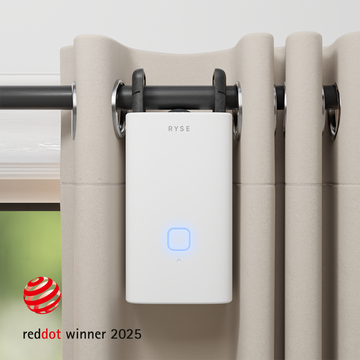
The RYSE SmartShade ($149.99) motorizes your existing beaded-chain shades, whether roller, zebra, or solar. Out of the box, two of its control methods need no internet at all:
- On-device buttons. Tap UP or DOWN on the SmartShade itself, and press STOP to hold it at any position. This works the same way whether your WiFi is up, down, or nonexistent.
- RYSE app over Bluetooth. Pair the SmartShade to your phone over Bluetooth and control it right from the RYSE app. You can move shades individually or in groups of up to 4 devices, all locally, with no router required.
So if all you want is quiet, motorized shades you can nudge from the couch, a SmartShade on its own does the job with zero network setup.
What Actually Requires WiFi
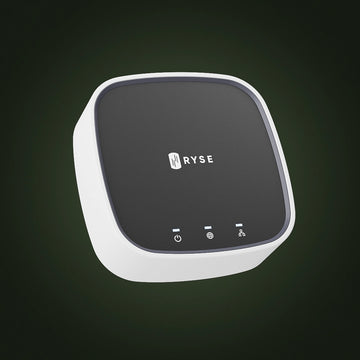
WiFi comes into play only when you add the RYSE SmartBridge ($49.99), a small hub that connects your shades to your home network. The SmartBridge unlocks the features that genuinely need a connection:
- Schedules. Open at sunrise, close at sunset, or set your own times so the shades run on their own.
- Voice control and integrations. Connect to Alexa, Google Home, Apple HomeKit, Control4, or IFTTT.
- Control from anywhere. Check and adjust your shades even when you are away from home.
- Bigger groups. Create groups of up to 10 shades instead of the 4 you get over Bluetooth.
One note worth knowing before you buy: the current SmartBridge model (BR-0201, sold in the US) can join your network wirelessly over WiFi or through the included Ethernet cable, whichever you prefer. Earlier BR-0101 units connect by Ethernet to your router. For the full breakdown of every control method, see RYSE's help article on how to control your SmartShades.
With WiFi vs Without: A Quick Comparison
| Capability | Without WiFi (SmartShade only) | With WiFi (SmartShade plus SmartBridge) |
|---|---|---|
| On-device buttons | Yes | Yes |
| App control over Bluetooth | Yes | Yes |
| Schedules (set times or sunrise and sunset) | No | Yes |
| Voice control (Alexa, Google, HomeKit) | No | Yes |
| Control while away from home | No | Yes |
| Maximum group size | Up to 4 shades | Up to 10 shades |
Key Benefits of the RYSE Approach
- Nothing breaks when the internet does. Core control lives on the device and over Bluetooth, so an outage never leaves you stuck at the window.
- Start small, add later. Buy a SmartShade now and add a SmartBridge whenever you want schedules or voice. Nothing you bought first goes to waste.
- Renter friendly. You can skip the network entirely, and because RYSE retrofits your existing shades with no drilling, there is nothing to undo when you move.
- One affordable hub for the whole home. A single SmartBridge at $49.99 covers your shades, rather than a pricey controller for every window.
Why RYSE Is a Top Choice
Plenty of smart shade systems fall apart the moment your WiFi does, because they route every command through the cloud. RYSE takes the opposite approach. The shade works on its own first, and the network is an upgrade you opt into. Add a SmartBridge and you gain schedules, voice, and remote access. Leave it off and you still have quiet, app-controlled shades that answer to a button on the wall. Either way, you are motorizing the shades you already own, with no drilling, no electrician, and nothing to leave behind when you move. Explore the RYSE SmartShade to get started.
Share with your community!
In this article
Sign up for our newsletter
Latest from experts

Automate Light for Your Houseplants: Smart Shade Routines for Fall and Winter

The Daylight Handoff: How Smart Shades and Smart Lights Can Take Turns Through the Day
